How to Send a WhatsApp Message Without Saving Number? (2026)
Home » How to Send a WhatsApp Message Without Saving Number? (2026)
How to Send a WhatsApp Message Without Saving Number? (The Ultimate Free Guide 2025)
Table of Contents
WhatsApp is undoubtedly the most popular messaging app in the world, connecting billions of people daily. It is perfect for talking to friends, family, and colleagues. However, it has one major annoyance that frustrates almost every user: The mandatory need to save a phone number before sending a message.
We have all been there. You need to send a quick location to a delivery rider, inquire about a product you saw online, or send a document to a printing shop. But to do that, you first have to save their number, wait for WhatsApp to sync contacts, and then finally send the message. Once the task is done, you are left with a cluttered phonebook filled with names like "Pizza Guy," "Plumber," or "Random Buyer."
But what if I told you there is a better way? A way to bypass this tedious process entirely?
In this comprehensive guide, we will explore how to send a WhatsApp message without saving the number. We will discuss free tools, manual tricks, and why protecting your privacy by not saving random contacts is more important than you think.
Why You Should Stop Saving Random Numbers
Before we dive into the "How," let's understand the "Why." You might think saving a contact is harmless, but in the digital age, it comes with privacy risks and clutter.
1. Privacy Concerns (The Biggest Risk)
WhatsApp privacy settings are often set to "My Contacts" by default. This means that as soon as you save someone's number to message them, they might be able to see your:
- Profile Picture: Do you want a random stranger to see your personal family photo?
- Last Seen & Online Status: They can track when you are active.
- WhatsApp Status/Stories: Many people share personal updates on their Status. If you save a stranger's number, they become a "Contact" and might view your daily updates without you realizing it.
2. Cluttered Phonebook
How many contacts do you have in your phone right now? If you scroll through them, you will likely find dozens of numbers you haven't spoken to in years. Keeping your contact list clean makes it easier to find the people who actually matter.
3. Time-Consuming Process
Saving a number takes time. You have to open the dialer, type the number, create a new contact, type a name, save it, open WhatsApp, refresh the list, and search for the name. This entire process takes 2-3 minutes. The direct method takes 5 seconds.
Method 1: The Easiest Solution – WSBot Direct Chat Tool (Recommended)
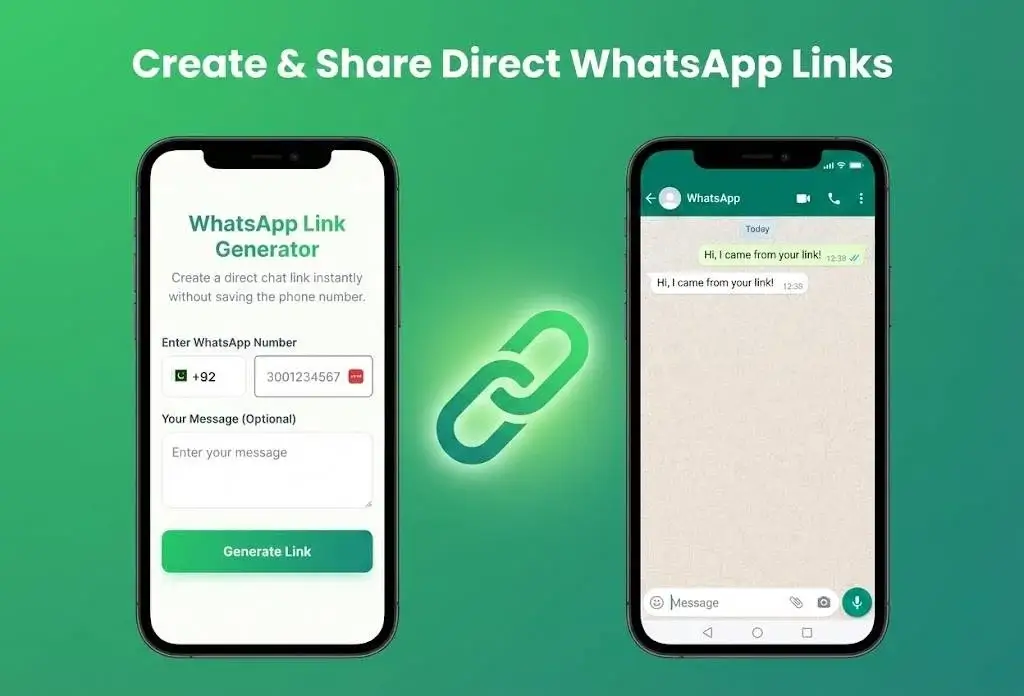
The smartest and fastest way to message an unsaved number is by using a dedicated web tool. At WSBot.top, we have developed a specialized, free tool designed exactly for this purpose.
Unlike other complex methods, our tool is designed for speed and simplicity. You don't need to be a tech expert to use it.
Step-by-Step Guide:
- Open the Tool: Navigate to our free WhatsApp Link Generator Tool.
- Select Country: Our tool automatically detects your location, but you can select any country code from the list (e.g., +1 for USA, +92 for Pakistan, +91 for India).
- Enter Number: Type the phone number of the person you want to contact.
- Add a Message (Optional): You can even type a pre-filled message like "Hi, I am at the gate" so you don't have to type it later.
- Click 'Open Chat': Hit the button, and WhatsApp will instantly open on your phone or computer with that specific chat window.
🚀 Why Use WSBot?
- No Installation Needed: Works directly in your browser (Chrome, Safari, etc.).
- 100% Free: No hidden charges or subscriptions.
- Secure: We do not store your numbers. The data stays on your device.
- Works on PC & Mobile: Compatible with WhatsApp Web and the Mobile App.
Method 2: The Manual "wa.me" Link Trick
If you don't want to use a tool interface and prefer doing things manually, WhatsApp provides an official API feature known as "Click to Chat." However, this method is slightly technical and prone to typing errors.
Here is how the wa.me short link works:
The Formula: https://wa.me/CountryCodePhoneNumber
How to do it manually:
- Open any web browser on your phone.
- Type
https://wa.me/in the address bar. - Add the phone number with the country code.
- Crucial Rule: Do not add any symbols like (+), (-), or (00) before the number.
Examples:
- ❌ Wrong: https://wa.me/+92-300-1234567
- ❌ Wrong: https://wa.me/00923001234567
- ✅ Correct: https://wa.me/923001234567
Once you type the correct URL and hit Enter, you will see a green webpage asking you to "Continue to Chat."
The Downside: The biggest problem with this method is that it is hard to remember. People often forget to remove the "+" sign or the leading zero, which results in a broken link. That is why using the WSBot Tool (Method 1) is much safer and faster.
Method 3: Using Third-Party Apps (Truecaller)
There are a few other ways to achieve this, though they require third-party apps.
For Android Users (Truecaller)
If you use Truecaller, you can search for a number within the app. Once the profile opens, there is often a WhatsApp icon. Clicking that icon will redirect you to WhatsApp. However, Truecaller is a heavy app and raises its own privacy concerns regarding data sharing.
For iPhone Users (Siri Shortcuts)
iOS users can create a "Shortcut" in the Apple Shortcuts app. You can program a script to ask for a number and open the WhatsApp URL scheme. While this is cool for tech-savvy users, setting it up is complicated for the average person.
Who Needs This Feature the Most?
Sending messages to unsaved numbers isn't just a convenient trick; for many professionals, it is a daily necessity. Here is how our tool helps different users:
1. Small Business Owners
If you run an e-commerce store or a local shop, you get dozens of inquiries daily. Saving every customer's number is impossible. Use the direct link generator to reply to leads instantly.
2. HR Recruiters
Recruiters often have to contact hundreds of candidates for interviews. Saving 500+ numbers just to send a "You are hired" message is inefficient. A direct chat tool streamlines the hiring process.
3. Real Estate Agents
Agents deal with property buyers and sellers all day. They need to share photos and locations quickly. Keeping their contact list clean helps them focus on serious clients only.
4. Everyday Users (Marketplace / Delivery)
Whether you are selling an item on an online marketplace or guiding a food delivery rider to your location, these are one-time interactions. There is absolutely no need to save these numbers permanently.
Frequently Asked Questions (FAQs)
Q: Is it safe to use the WhatsApp Link Generator?
A: Yes, absolutely. WSBot.top uses the official WhatsApp API. We act as a bridge to format the link correctly. Your data is not stored on our servers.
Q: Can I send messages to international numbers?
A: Yes. As long as you know the correct country code (e.g., +44 for UK, +1 for US), you can message anyone anywhere in the world.
Q: Does this work on WhatsApp Business?
A: Yes, the generated links open in whichever WhatsApp app you have installed as your default, whether it is personal WhatsApp or WhatsApp Business.
Q: Can I create a link with a pre-filled message?
A: Yes! Our tool allows you to add a custom message. When the chat opens, that text will automatically appear in the typing area, ready to be sent.
Conclusion
In 2025, digital privacy and efficiency are key. There is no reason to clutter your smartphone with temporary contacts just to send a single message.
While manual methods exist, they are prone to errors. The best, fastest, and most secure way is to use a dedicated tool like WSBot.
Ready to start chatting? Bookmark our Free WhatsApp Direct Chat Tool today and experience a cleaner, faster WhatsApp experience!